By Jason Smith
•
November 16, 2025
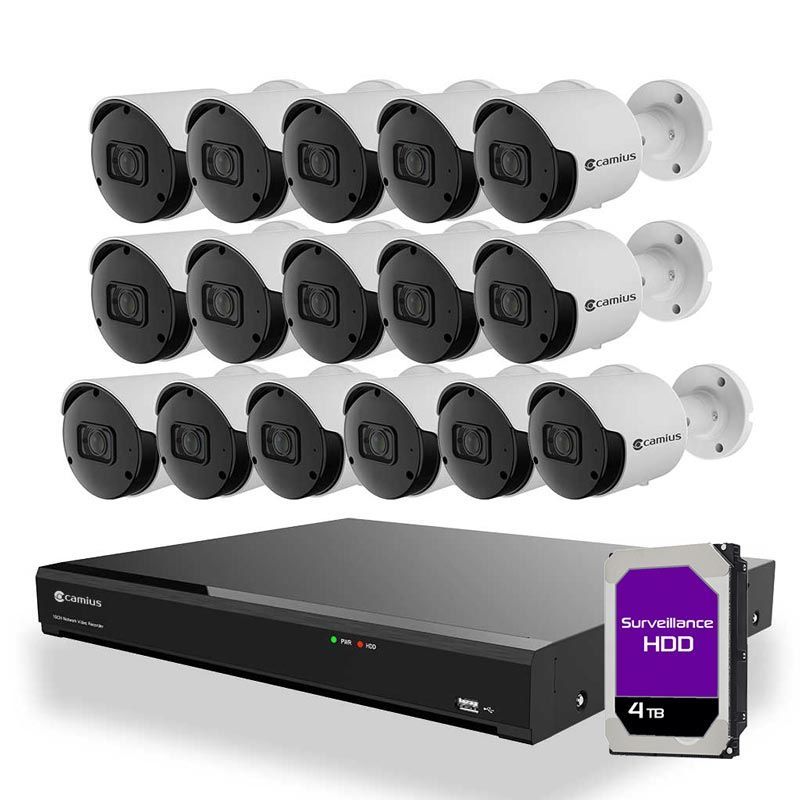
It’s tempting to believe everything in a modern smart home can run on Wi-Fi. Device manufacturers market “wireless only” as clean, simple, and future-ready. But in real homes across Montana, we see the opposite: The most reliable, high-performance smart homes are built on a hardwired backbone, with Wi-Fi used strategically — not for everything. As a Level Up Automation partner here in Montana, Smart Home Solutions designs, wires, and supports smart homes every day. And we can tell you with confidence: pulling low-voltage wire during construction or remodel is one of the smartest investments you can make. Let’s break down why. Wireless Isn’t Bad — It’s Just Not Enough To be clear: Wi-Fi isn’t the enemy. You need wireless for: Phones and tablets Laptops and casual browsing Voice assistants and handheld remotes Some smart devices that don’t offer a wired option But Wi-Fi has real limits. It’s: Shared by every wireless device in your home Affected by walls, distance, and interference Sensitive to congestion when many devices are active A hardwired network doesn’t have those problems. When we wire your core devices and strategically place wired access points, Wi-Fi can do what it does best—serve mobile devices—without being overloaded by everything else. You Have 1 Gig Coming In. Why Doesn’t It Feel Like 1 Gig? Many Montana homes we work on now have 1 gigabit (or faster) internet service. On paper, that sounds like endless speed. In practice, it’s more like this: Your internet service brings up to 1 Gbps into your router. Your router then shares that bandwidth across all connected devices: wired and wireless. Wi-Fi clients are all competing for airtime on the same radios. Now imagine a typical modern home: 2–4 smart TVs streaming HD or 4K 6–12 security cameras 2 parents on video calls 2–4 kids gaming or streaming 30–60 “smart” devices (thermostats, locks, lights, doorbells, speakers, etc.) Even if each device doesn’t use a ton of bandwidth, Wi-Fi radios can only handle so many active conversations at once. The more devices you stack on top, the more: Latency increases Buffering happens Calls drop Apps feel “laggy” And this leads to a common complaint we hear: “We’re paying for fast internet, but things still feel slow.” Often, the problem isn’t your internet service. It’s the way everything is fighting over Wi-Fi. Why Hardwired Devices Perform More Consistently Let’s talk about what happens when you plug things in. When a device is hardwired (using CAT6 or better) into your network: It doesn’t rely on signal strength or distance. It doesn’t share wireless airtime with other devices. It gets lower latency and more consistent throughput. It frees up Wi-Fi capacity for devices that truly need wireless. Most modern routers and network switches are designed so that wired traffic is handled faster and more predictably than wireless traffic. Wired connections are: Full-duplex (can send and receive at once) Less error-prone Not contending for space on the radio So when we hardwire: Smart TVs and streaming boxes Gaming consoles Network video recorders (NVRs) Smart home processors and controllers Desktop computers and workstations Audio systems and AV racks Security systems …we dramatically reduce the load on your Wi-Fi and give those devices rock-solid performance. Wired Access Points vs Mesh Wi-Fi: What’s the Difference? This is one of the most important distinctions we explain to homeowners and builders. Mesh Wi-Fi (Wireless Backhaul) Popular mesh systems (Eero, Orbi, Google Nest, etc.) usually work like this: You place several nodes around your home. Those nodes talk to each other wirelessly (this connection is called backhaul). The same wireless spectrum is used both for backhaul and for your devices. The downside? Every time mesh nodes talk to each other, they use up airtime that your phones, laptops, and TVs also need. As you add more mesh points, you can actually add more overhead and more interference, not just more coverage. Mesh is an improvement over a single cheap router in a closet, but it’s still a compromise. Wired Access Points (Structured Network Design) A wired access point system — like what we design and install as Level Up Automation Montana — works differently: Each access point is connected back to the main network using hardwired CAT6. The “backhaul” is all on wire, not over the air. Wireless radios on each AP are focused on serving your devices, not talking to each other. The benefits: Faster, more consistent Wi-Fi speeds throughout the home Much better performance under load (multiple streams, cameras, calls, etc.) Cleaner hand-offs as you move from one area to another Enterprise-style reliability in a residential setting This is the same architecture used in offices, schools, and commercial spaces—scaled and tuned for your home. Short-Term Benefits of Pulling Wire During Construction If you’re in the design, framing, or rough-in phase of a new home or major remodel, pulling low-voltage wire right now delivers immediate benefits: Better Wi-Fi performance from day one, thanks to wired access points Cleaner TV and AV installations with hidden wiring instead of visible cables Less strain on your wireless network when high-demand devices are wired Fewer callbacks and frustration over “mystery Wi-Fi issues” And compared to what you’re already spending on the rest of the project, low-voltage wiring is a relatively small line item with outsized impact. Long-Term Benefits: Future-Proofing Your Smart Home Here’s where wiring really pays off over the life of the home. 1. Ready for Whatever Comes Next 8K streaming, VR, AR, new smart home platforms, AI-powered devices—these all demand stable, high-bandwidth connections. Your low-voltage wiring can last decades. Wi-Fi standards will change every few years. 2. Less Destructive Work Later Trying to retrofit wiring into a finished home is messy: cutting drywall, fishing wires, patching and painting. Doing it while walls are open is vastly cheaper and cleaner. 3. Higher Resale Appeal Buyers are increasingly asking about: Strong Wi-Fi and coverage Wired home office options Pre-wire for audio, security, and networking A home with structured wiring and wired access points stands out. 4. More Reliable Security & Life Safety Security cameras, alarm systems, access control, and NVRs all benefit from being wired. When it comes to security, we want fewer variables and more certainty. 5. A Better Everyday Experience When the network just works, you notice it by not noticing it: No random buffering Fewer dropped calls Less “tech support” stress for the whole family The Right Mix: Hardwired Backbone + Smart Wireless The goal isn’t to get rid of Wi-Fi. The goal is to design a balanced, high-performance smart home network: A hardwired backbone (CAT6 or better) for your heavy-use and always-on devices Wired access points placed strategically for full-home coverage Wi-Fi reserved for mobile devices and gear that truly needs to be wireless This is the approach we take on every Level Up Automation Montana project, whether we’re working with a builder, architect, designer, or homeowner directly. Planning a New Build or Remodel in Montana? Let’s Get the Wiring Right. If you’re building or renovating in Missoula, the Bitterroot, or anywhere in Western Montana, this is the perfect time to design your network the right way: Pre-wire for data, audio, and video Plan locations for wired access points Decide which devices will be hardwired vs wireless Coordinate with your builder, electrician, and designer so everything works together At Smart Home Solutions, your local Level Up Automation partner, we handle: Design – smart home networking, Wi-Fi, and device layout Pre-wire & trim-out – clean, documented, labeled cabling Programming & support – so your smart home feels simple, not overwhelming